
Last Updated on 1 July 2024
Introduction
Have you seen the falling matrix code effects in the movie “The Matrix”? In the realm of computer graphics, it was an iconic visual effect. What if I tell you that, you can create almost the same matrix effect using a Python program? Sounds ridiculous, right?
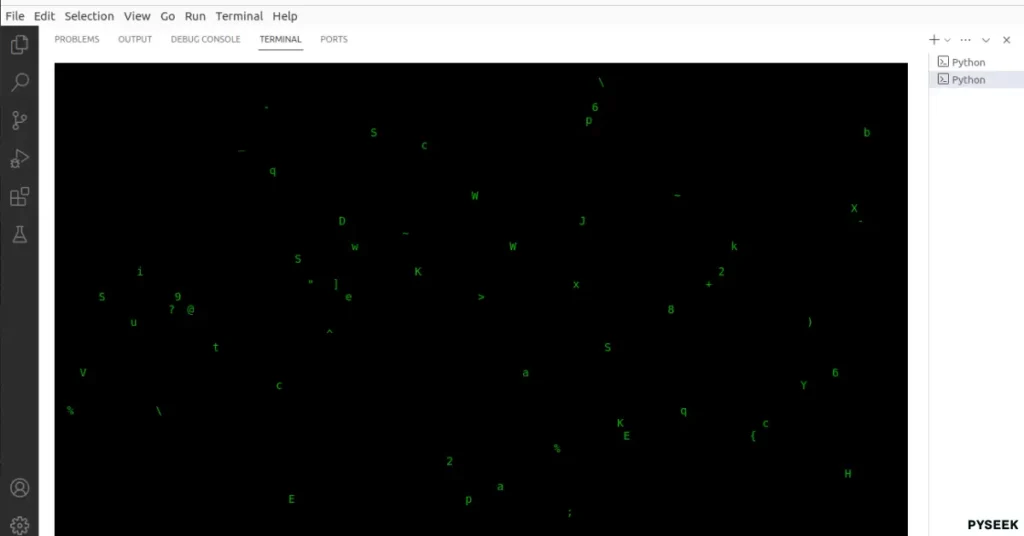
In this article, we will create a Python program using the ‘curses‘ library that will simulate the matrix effect within the terminal or console. We’ll explore how to manipulate the terminal screen, generate random characters, and create the illusion of falling code, all in the crisp green glow reminiscent of the movie.
So, get ready to explore a cascade of digital matrix rain on your terminal window!
Setting Up the Environment
Make sure Python is installed on your system, along with the ‘curses‘ (Documentation) library, which is a standard Python library for creating text-based user interfaces. You can download Python from their official website (https://www.python.org/), and ‘curses‘ should come pre-installed with Python on most Unix-like systems.
If you are using the Windows operating system, use the following command to install the curses library:
pip install windows-curses
The Program
import curses
import random
import signal
import sys
import time

# A signal handler function to handle interrupts
def signal_handler(sig, frame):
    curses.endwin()
    sys.exit(0)

# Main function
def main(stdscr):
    # Hide the cursor
    curses.curs_set(0)

    # Initialize colors
    curses.start_color()
    curses.init_pair(1, curses.COLOR_GREEN, curses.COLOR_BLACK)

    # Get the maximum y and x coordinates of the screen
    max_y, max_x = stdscr.getmaxyx()

    # Initialize a list to keep track of the current position of characters in each column
    columns = [0] * max_x

    # Main loop for the matrix rain effect
    while True:
        # Clear the screen
        stdscr.clear()

        # Iterate through each column
        for x in range(max_x):
            # Check if the column is not full and randomly decide whether to add a new character
            if columns[x] < max_y - 1 and random.randint(0, 10) > 5:
                y = columns[x]
                stdscr.addstr(y, x, chr(random.randint(33, 126)), curses.color_pair(1))
                columns[x] += 1
            # If the column is full, wrap the character to the top of the screen
            elif columns[x] >= max_y - 1:
                stdscr.addstr(0, x, chr(random.randint(33, 126)), curses.color_pair(1))
                columns[x] = 0

        # Refresh the screen to display the changes
        stdscr.refresh()

        # Introduce a small delay to control the speed of the falling characters
        time.sleep(0.05)

# Entry point of the program
if __name__ == "__main__":
    # Set up a signal handler to handle interrupts
    signal.signal(signal.SIGINT, signal_handler)

    # Run the main function
    curses.wrapper(main)
Output
Summary
In this article, we’ve explored how to create a matrix effect using Python and the curses library. It was a fun exercise and showcased the versatility and creativity that Python offers to developers. Please feel free to experiment with different colors, speeds, and characters to make the matrix rain effect your own!
For any queries or feedback, leave your thoughts in the comments below. I would love to hear from you!
Want more Cool Python Programs like this? Explore our separate page packed with unique ideas. Here are a few examples to spark your interest:
- Wish Happy Birthday using Python Programs
- Say I Love You using a Python Code
- Creating a Colorful Sketch of Messi using a Python Code
- Create a Password Generator Program in Python
Happy Coding!