
Last Updated on 29 June 2024

Introduction
Have you ever wished for a translator who’s available 24/7 to handle all your language needs? While hiring a human translator might seem ideal, it’s not always practical.
This is where Google Translate comes in. It’s a free, reliable, and always-on translation service. But did you know there’s more? Python has a library called googletrans that acts as an API for translating languages within your Python programs.
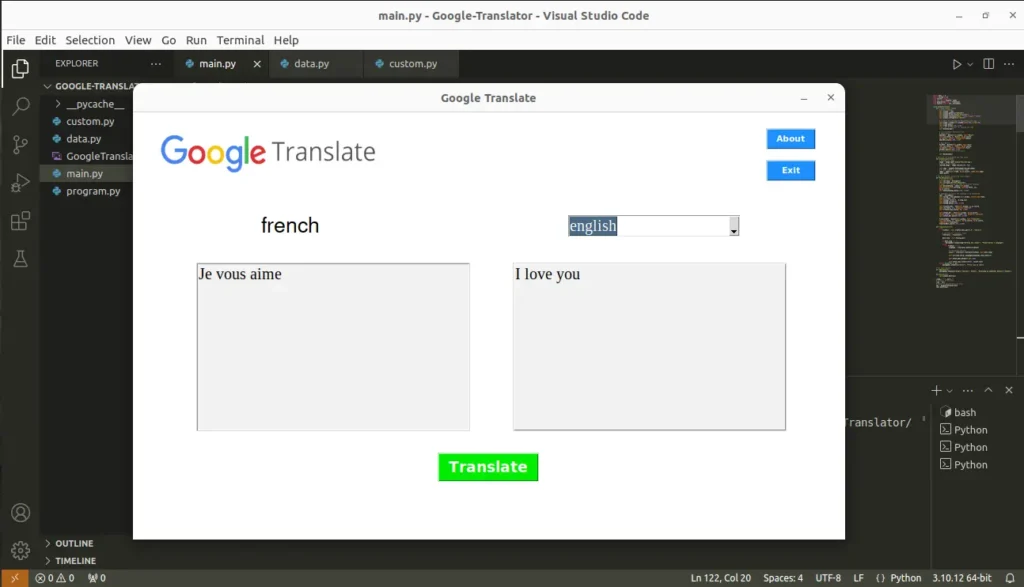
This library supports an impressive 107 languages, and I’ve used it to build a Language Translator Application in Python where the graphical interface is designed using Tkinter.
In this tutorial, you’ll learn:
- How to translate between languages using the
googletranslibrary. - The source code for this Language Translator Application, complete with a user-friendly interface that supports all 107 languages.
Requirements
Make sure to use the googletrans (Documentation) library using the following command:
pip install googletrans-py
Don’t worry about Tkinter (Documentation), by default it comes with most Python installations. However, if you don’t have it, you can install it using pip:
pip install tk
Exploring Available Languages
Let’s find out how many languages the googletrans library offers and their details.
import googletrans

# Find all languages
languages = googletrans.LANGUAGES

print(f"Total no. of languages: {len(languages)}")
print("\nAll languages are here:\n")
print(languages)
Output
Total no. of languages: 107

All languages are here:

{'af': 'afrikaans', 'sq': 'albanian', 'am': 'amharic', 'ar': 'arabic', 'hy': 'armenian', 'az': 'azerbaijani', 'eu': 'basque', 'be': 'belarusian', 'bn': 'bengali', 'bs': 'bosnian', 'bg': 'bulgarian', 'ca': 'catalan', 'ceb': 'cebuano', 'ny': 'chichewa', 'zh-cn': 'chinese (simplified)', 'zh-tw': 'chinese (traditional)', 'co': 'corsican', 'hr': 'croatian', 'cs': 'czech', 'da': 'danish', 'nl': 'dutch', 'en': 'english', 'eo': 'esperanto', 'et': 'estonian', 'tl': 'filipino', 'fi': 'finnish', 'fr': 'french', 'fy': 'frisian', 'gl': 'galician', 'ka': 'georgian', 'de': 'german', 'el': 'greek', 'gu': 'gujarati', 'ht': 'haitian creole', 'ha': 'hausa', 'haw': 'hawaiian', 'iw': 'hebrew', 'he': 'hebrew', 'hi': 'hindi', 'hmn': 'hmong', 'hu': 'hungarian', 'is': 'icelandic', 'ig': 'igbo', 'id': 'indonesian', 'ga': 'irish', 'it': 'italian', 'ja': 'japanese', 'jw': 'javanese', 'kn': 'kannada', 'kk': 'kazakh', 'km': 'khmer', 'ko': 'korean', 'ku': 'kurdish (kurmanji)', 'ky': 'kyrgyz', 'lo': 'lao', 'la': 'latin', 'lv': 'latvian', 'lt': 'lithuanian', 'lb': 'luxembourgish', 'mk': 'macedonian', 'mg': 'malagasy', 'ms': 'malay', 'ml': 'malayalam', 'mt': 'maltese', 'mi': 'maori', 'mr': 'marathi', 'mn': 'mongolian', 'my': 'myanmar (burmese)', 'ne': 'nepali', 'no': 'norwegian', 'or': 'odia', 'ps': 'pashto', 'fa': 'persian', 'pl': 'polish', 'pt': 'portuguese', 'pa': 'punjabi', 'ro': 'romanian', 'ru': 'russian', 'sm': 'samoan', 'gd': 'scots gaelic', 'sr': 'serbian', 'st': 'sesotho', 'sn': 'shona', 'sd': 'sindhi', 'si': 'sinhala', 'sk': 'slovak', 'sl': 'slovenian', 'so': 'somali', 'es': 'spanish', 'su': 'sundanese', 'sw': 'swahili', 'sv': 'swedish', 'tg': 'tajik', 'ta': 'tamil', 'te': 'telugu', 'th': 'thai', 'tr': 'turkish', 'uk': 'ukrainian', 'ur': 'urdu', 'ug': 'uyghur', 'uz': 'uzbek', 'vi': 'vietnamese', 'cy': 'welsh', 'xh': 'xhosa', 'yi': 'yiddish', 'yo': 'yoruba', 'zu': 'zulu'}
As you can see in the previous output, all the languages are listed in a Python dictionary. Each language has a unique identifier (short name) associated with it. When we use our program, we’ll reference these short names instead of the full language names for easier handling.
Translate Your First Text
Now, let’s write a Python program to translate a text from Spanish to English. It’s important to note that the googletrans library automatically assumes the target language is English unless specified otherwise. For languages other than English, you’ll need to provide the short code name associated with the target language.
from googletrans import Translator

# In Spanish
text = "Gracias traductor de Google"

# Instance of Translator class
translator = Translator()

# Detect Language
langType = translator.detect(text)

# Translating the text
result = translator.translate(text)

# Output in Compact form
print(langType)
print(result)

# Printing the output in a convenient way
print(f"\nDetected language: {langType.lang}")
print(f"Translated text: {result.text}")
Output
Detected(lang=es, confidence=None)
Translated(src=es, dest=en, text=Thanks Google translator, pronunciation=None, extra_data="{'confiden...")

Detected language: es
Translated text: Thanks Google translator
As you can see from the output, the translation process provides two additional details beyond the translated text:
- Detected Language: This tells you the language the library identified in the source text (the one you used for translation).
- Confidence Score: This indicates the library’s confidence level that the detected language is correct, expressed as a probability.
Specify Your Target Language
Let’s translate a text from English to French (‘fr’). Since French (‘fr’) is not the default English translation, we need to specify it during the translation process. Here’s the program demonstrating this concept:
from googletrans import Translator

# English
text = "Thank you Google Translate"

# Instance of Translator class
translator = Translator()

# Translating the text
result = translator.translate(text, src='en', dest='fr')

print(f"Translated text: {result.text}")
Output
Translated text: Merci Google TraductionIn the translate() method we specify two optional parameters to refine the translation process:
- ‘src‘: This specifies the source language of the text you’re translating. If omitted, the library will detect it automatically.
- ‘dest‘: This defines the target language you want the text translated into.
Now you know the basics of using googletrans library for translation which is enough to understand the coding of the language translator application.
All you need now is a basic understanding of Python programming language and Tkinter functionalities. You can explore various Python Tutorials on our Website here: Python Tutorials.
The Translator Application
Create a separate folder for this project and name it “Google-Translator”. Now download the logo used in the application GoogleTranslate.png and place it into the project folder.
main.py
Let’s create a Python file named ‘main.py‘ inside the main project directory (“Google-Translator”) and start implementing the program step-by-step.
Import Necessary Modules
import data as d
import custom as cs
from tkinter import *
from PIL import ImageTk, Image
from googletrans import Translator
from tkinter import ttk, messagebox
Define the Google Translate Class
Create a class and give it the name GoogleTranslate.
class GoogleTranslate:
Create the Main Application Window
The __init__ method will create the main application window for us. Here, we set the window size, title, resizable option, two additional buttons, etc.
    def __init__(self, root):
        # Window Settings
        self.window = root
        self.window.geometry("900x540")
        self.window.title('Google Translate')
        self.window.resizable(width = False, height = False)
        self.window.configure(bg="white")

        # A Frame: For showing the GoogleTranslate Logo
        self.frame = Frame(self.window,width=300, height=60)
        self.frame.pack()
        self.frame.place(x=20, y=20)
        # Calling the function for showing the Logo
        self.DisplayLogo()

        # ========Header Buttons========
        # About Button
        aboutBtn = Button(self.window, text="About",
        font=(cs.font2, 8, 'bold'), bg=cs.color2,
        fg="white", width=5, command=self.About)
        aboutBtn.place(x=800, y=20)

        # Exit Button
        exitBtn = Button(self.window, text="Exit",
        font=(cs.font2, 8, 'bold'), bg=cs.color2,
        fg="white", width=5, command=self.Exit)
        exitBtn.place(x=800, y=60)
        # ==============================

        self.MainWindow()
Display the Logo
In the above code, we called a method to display the logo in our application. Let’s define the method here:
    def DisplayLogo(self):
        # Opening the image
        image = Image.open('GoogleTranslate.png')
        # Resizing the image
        resized_image = image.resize((300, 60))

        self.img1 = ImageTk.PhotoImage(resized_image)
        # A Label Widget to display the Image
        label = Label(self.frame, bg=cs.color1, image=self.img1)
        label.pack()
Define Main Window
Now, we’ll define the different parts you’ll see on the application window. These include labels for instructions, text boxes for entering text, a dropdown menu for choosing languages, and a button to trigger action.
    def MainWindow(self):
        # String Variable
        self.currLang = StringVar()
        self.currLang.set("Not Detected")
        # Label: For showing the name of detected language
        self.detectedLang = Label(self.window,
        textvariable=self.currLang, font=(cs.font3, 20),
        bg=cs.color1)
        self.detectedLang.place(x=160, y=130)

        # Combobox: To select the language to be translated
        text = StringVar()
        self.toLang = ttk.Combobox(self.window, textvariable=text,
        font=(cs.font1, 15))
        self.toLang['values'] = d.lang_list
        self.toLang.current(0)
        self.toLang.place(x=550, y=130)

        self.fromText_Box = Text(self.window, bg=cs.color3,
        font=(cs.font1, 15), height=9, width=34)
        self.fromText_Box.place(x=80, y=190)

        self.toText_Box = Text(self.window, bg=cs.color3,
        relief=GROOVE, font=(cs.font1, 15), height=9, width=34)
        self.toText_Box.place(x=480, y=190)

        translateBtn = Button(self.window, text="Translate",
        font=(cs.font2, 14, "bold"), bg=cs.color4, fg=cs.color1,
        command=self.Translator)
        translateBtn.place(x=385, y=430)
Perform the Translation
So far, we’ve built the visual part of the application (the interface). Now, it’s time to add the magic! Let’s define a method called Translator that handles the core functionality: translating text from one language to another.
    def Translator(self):
        try:
            fromText = self.fromText_Box.get("1.0", "end-1c")

            # Instance of Translator class
            translator = Translator()

            dest_lang = self.toLang.get()

            if dest_lang == '':
                messagebox.showwarning("Nothing has chosen!", "Please Select a Language")
            else:
                if fromText != '':
                    langType = translator.detect(fromText)

                    # Translating the text
                    result = translator.translate(fromText, dest=dest_lang)

                    self.currLang.set(d._languages[langType.lang.lower()])

                    self.toText_Box.delete("1.0", END)

                    self.toText_Box.insert(INSERT, result.text)
        except Exception as es:
            messagebox.showerror("Error!", f"Error due to {es}")
Miscellaneous Methods
Our translator application has two buttons in the header: “About” and “Exit.” To make them useful, let’s define two methods: About and Exit. These methods will control what happens when each button is clicked.
    def About(self):
        messagebox.showinfo("Google Translate - Python", "Developed by Subhankar Rakshit\n~PySeek")

    def Exit(self):
        self.window.destroy()
Initializing the Application
In the main part of your code, create an instance of the GoogleTranslate class to build the GUI, and then start the main loop.
if __name__ == "__main__":
    # Instance of Tk Class
    root = Tk()
    # Object of GoogleTranslator Class
    obj = GoogleTranslate(root)
    root.mainloop()
In this block of code, we check if the script is being run as the main program (__name__ == “__main__”). This ensures that the code inside this block only runs when the script is executed, not when it’s imported as a module.
data.py
languages = {'afrikaans': 'af', 'albanian': 'sq',
'amharic': 'am', 'arabic': 'ar', 'armenian': 'hy',
'azerbaijani': 'az', 'basque': 'eu', 'belarusian': 'be',
'bengali': 'bn', 'bosnian': 'bs', 'bulgarian': 'bg',
'catalan': 'ca', 'cebuano': 'ceb', 'chichewa': 'ny',
'chinese (simplified)': 'zh-cn', 'chinese (traditional)': 'zh-tw',
'corsican': 'co', 'croatian': 'hr', 'czech': 'cs',
'danish': 'da', 'dutch': 'nl', 'english': 'en',
'esperanto': 'eo', 'estonian': 'et', 'filipino': 'tl',
'finnish': 'fi', 'french': 'fr', 'frisian': 'fy',
'galician': 'gl', 'georgian': 'ka', 'german': 'de',
'greek': 'el', 'gujarati': 'gu', 'haitian creole': 'ht',
'hausa': 'ha', 'hawaiian': 'haw', 'hebrew': 'he',
'hindi': 'hi', 'hmong': 'hmn', 'hungarian': 'hu',
'icelandic': 'is', 'igbo': 'ig', 'indonesian': 'id',
'irish': 'ga', 'italian': 'it', 'japanese': 'ja',
'javanese': 'jw', 'kannada': 'kn', 'kazakh': 'kk',
'khmer': 'km', 'korean': 'ko', 'kurdish (kurmanji)': 'ku',
'kyrgyz': 'ky', 'lao': 'lo', 'latin': 'la', 'latvian': 'lv',
'lithuanian': 'lt', 'luxembourgish': 'lb', 'macedonian': 'mk',
'malagasy': 'mg', 'malay': 'ms', 'malayalam': 'ml',
'maltese': 'mt', 'maori': 'mi', 'marathi': 'mr',
'mongolian': 'mn', 'myanmar (burmese)': 'my', 'nepali': 'ne',
'norwegian': 'no', 'odia': 'or', 'pashto': 'ps', 'persian': 'fa',
'polish': 'pl', 'portuguese': 'pt', 'punjabi': 'pa',
'romanian': 'ro', 'russian': 'ru', 'samoan': 'sm',
'scots gaelic': 'gd', 'serbian': 'sr', 'sesotho': 'st',
'shona': 'sn', 'sindhi': 'sd', 'sinhala': 'si', 'slovak': 'sk',
'slovenian': 'sl', 'somali': 'so', 'spanish': 'es',
'sundanese': 'su', 'swahili': 'sw', 'swedish': 'sv',
'tajik': 'tg', 'tamil': 'ta', 'telugu': 'te', 'thai': 'th',
'turkish': 'tr', 'ukrainian': 'uk', 'urdu': 'ur',
'uyghur': 'ug', 'uzbek': 'uz', 'vietnamese': 'vi',
'welsh': 'cy', 'xhosa': 'xh', 'yiddish': 'yi',
'yoruba': 'yo', 'zulu': 'zu'}

_languages = {'af': 'afrikaans', 'sq': 'albanian',
'am': 'amharic', 'ar': 'arabic', 'hy': 'armenian',
'az': 'azerbaijani', 'eu': 'basque', 'be': 'belarusian',
'bn': 'bengali', 'bs': 'bosnian', 'bg': 'bulgarian',
'ca': 'catalan', 'ceb': 'cebuano', 'ny': 'chichewa',
'zh-cn': 'chinese (simplified)', 'zh-tw': 'chinese (traditional)',
'co': 'corsican', 'hr': 'croatian', 'cs': 'czech',
'da': 'danish', 'nl': 'dutch', 'en': 'english', 'eo': 'esperanto',
'et': 'estonian', 'tl': 'filipino', 'fi': 'finnish',
'fr': 'french', 'fy': 'frisian', 'gl': 'galician', 'ka':
'georgian', 'de': 'german', 'el': 'greek', 'gu': 'gujarati',
'ht': 'haitian creole', 'ha': 'hausa', 'haw': 'hawaiian',
'iw': 'hebrew', 'he': 'hebrew', 'hi': 'hindi', 'hmn': 'hmong',
'hu': 'hungarian', 'is': 'icelandic', 'ig': 'igbo',
'id': 'indonesian', 'ga': 'irish', 'it': 'italian',
'ja': 'japanese', 'jw': 'javanese', 'kn': 'kannada',
'kk': 'kazakh', 'km': 'khmer', 'ko': 'korean',
'ku': 'kurdish (kurmanji)', 'ky': 'kyrgyz', 'lo': 'lao',
'la': 'latin', 'lv': 'latvian', 'lt': 'lithuanian',
'lb': 'luxembourgish', 'mk': 'macedonian', 'mg': 'malagasy',
'ms': 'malay', 'ml': 'malayalam', 'mt': 'maltese',
'mi': 'maori', 'mr': 'marathi', 'mn': 'mongolian',
'my': 'myanmar (burmese)', 'ne': 'nepali', 'no': 'norwegian',
'or': 'odia', 'ps': 'pashto', 'fa': 'persian', 'pl': 'polish',
'pt': 'portuguese', 'pa': 'punjabi', 'ro': 'romanian',
'ru': 'russian', 'sm': 'samoan', 'gd': 'scots gaelic',
'sr': 'serbian', 'st': 'sesotho', 'sn': 'shona', 'sd': 'sindhi',
'si': 'sinhala', 'sk': 'slovak', 'sl': 'slovenian',
'so': 'somali', 'es': 'spanish', 'su': 'sundanese',
'sw': 'swahili', 'sv': 'swedish', 'tg': 'tajik', 'ta': 'tamil',
'te': 'telugu', 'th': 'thai', 'tr': 'turkish', 'uk': 'ukrainian',
'ur': 'urdu', 'ug': 'uyghur', 'uz': 'uzbek', 'vi': 'vietnamese',
'cy': 'welsh', 'xh': 'xhosa', 'yi': 'yiddish', 'yo': 'yoruba',
'zu': 'zulu'}

lang_list = ['afrikaans', 'albanian', 'amharic', 'arabic',
'armenian', 'azerbaijani', 'basque', 'belarusian', 'bengali',
'bosnian', 'bulgarian', 'catalan', 'cebuano', 'chichewa',
'chinese (simplified)', 'chinese (traditional)', 'corsican',
'croatian', 'czech', 'danish', 'dutch', 'english', 'esperanto',
'estonian', 'filipino', 'finnish', 'french', 'frisian',
'galician', 'georgian', 'german', 'greek', 'gujarati',
'haitian creole', 'hausa', 'hawaiian', 'hebrew', 'hindi',
'hmong', 'hungarian', 'icelandic', 'igbo', 'indonesian',
'irish', 'italian', 'japanese', 'javanese', 'kannada', 'kazakh',
'khmer', 'korean', 'kurdish (kurmanji)', 'kyrgyz', 'lao', 'latin',
'latvian', 'lithuanian', 'luxembourgish', 'macedonian',
'malagasy', 'malay', 'malayalam', 'maltese', 'maori',
'marathi', 'mongolian', 'myanmar (burmese)', 'nepali',
'norwegian', 'odia', 'pashto', 'persian', 'polish', 'portuguese',
'punjabi', 'romanian', 'russian', 'samoan', 'scots gaelic',
'serbian', 'sesotho', 'shona', 'sindhi', 'sinhala', 'slovak',
'slovenian', 'somali', 'spanish', 'sundanese', 'swahili',
'swedish', 'tajik', 'tamil', 'telugu', 'thai', 'turkish',
'ukrainian', 'urdu', 'uyghur', 'uzbek', 'vietnamese', 'welsh',
'xhosa', 'yiddish', 'yoruba', 'zulu']
In this program file, we declare two Python dictionaries (‘languages‘, and ‘_languages‘) and a Python list (‘lang_list‘) to manage languages:
- ‘languages‘: This stores the full language names, mapped to their corresponding short codes used by the
googletranslibrary. - ‘_languages‘: This dictionary flips the logic of ‘languages‘, mapping shortcodes back to the full language names.
- ‘lang_list‘: This is a simple Python list containing all the full language names for easy display in the application.
custom.py
Now, let’s take a look at the custom.py file. This file acts as our style guide, storing all the colors and fonts used throughout the application. Keeping them in one place makes it much easier to customize the design later.
# Color options
color1 = "white"
color2 = "dodger blue"
color3 = "gray95"
color4 = "green2"
# Font options
font1 = "times new roman"
font2 = "Kokila"
font3 = "Helvetica"
Output
Watch the entire video to understand how this Python Translator Application works:
Summary
Congratulations! You’ve learned the power of the googletrans library for translating languages in Python. We started by exploring the library’s functionalities, then built a user-friendly translator application using Tkinter. Just like the familiar Google Translate, this app lets you easily convert between 107 languages.
This project is a fantastic way to level up your Python skills and have some fun! Imagine you are translating your favorite quote into a new language to share with a friend or loved one.
Let me know your thoughts and creations in the comments below – I would love to hear from you!
Ready to explore more cool Python Projects? Explore our dedicated page packed with unique ideas. Here are a few examples to spark your interest:
- Create a Meditation App in Python with Tkinter
- Create a Typing Speed Tester in Python with Tkinter
- Create an Age Calculator in Python using Tkinter
- Create an Alarm Clock using Python with Tkinter
Happy translating!